
2026 IRS rate reference
72.5 cents per mile is visible as recordkeeping context, while users remain responsible for tax decisions.
Automatic mileage logs for 1099 service work
MileLedger helps U.S. self-employed service pros capture client visits, job-site drives, estimates, and supply runs, then review purpose and export cleaner mileage records for tax time.
Not tax filing software. Not a broad expense suite. A mileage log built around work drives first.
Reviewed record
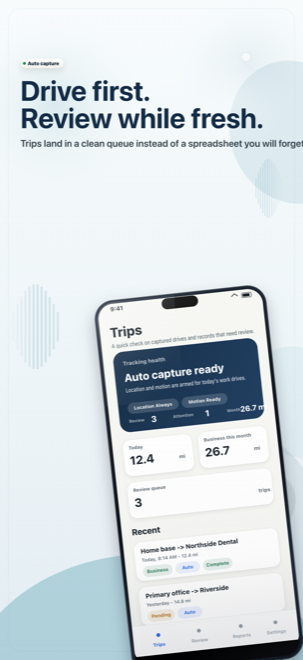
26.7 business miles Client visit, supply run, and excluded commute kept separate before export.72.5 cents per mile is visible as recordkeeping context, while users remain responsible for tax decisions.
The first story is client visits, job sites, estimates, and supply runs, not a generic driving log for everyone.
Exports are organized around reviewed records, business miles, purpose, and context instead of app screenshots.
Records stay on-device by default unless the user chooses to export or share them.
Point of view
MileLedger is designed around the real service day: short drives, client context, and a record that can be reviewed before tax season.
One workday, one cleaner log
Instead of rebuilding routes from maps and calendar notes, the app keeps each trip draft close to the client, job, and business purpose that made it happen.
Product proof
The story is simple: catch the drive, review the reason, keep the context, and export something clearer than a tax-season spreadsheet.
Client visits and supply runs become drafts before details fade.
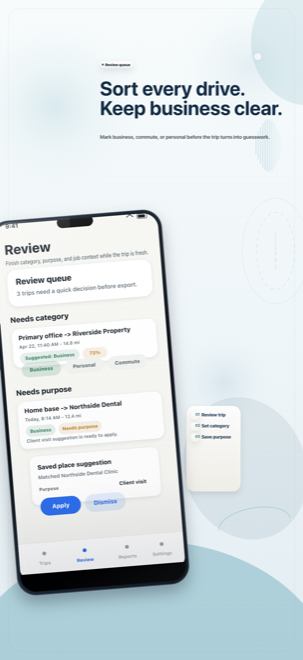
Unfinished trips stay visible while the job is still fresh.
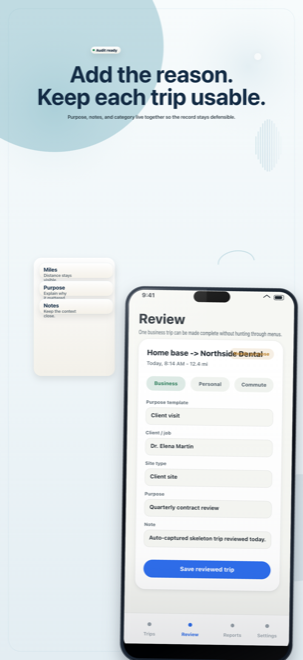
Business, commute, and personal choices stay explicit.
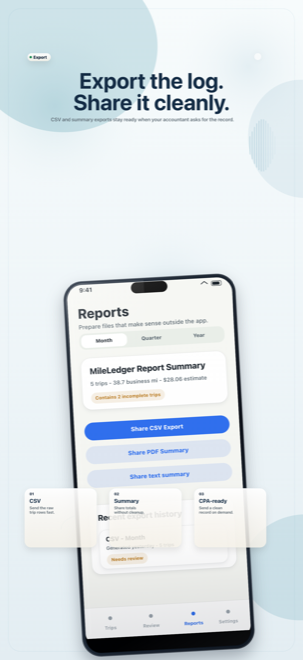
Package mileage totals and context for tax-season review.
Workflow
Capture makes the draft. Review keeps the user in control. Context makes the export useful later.
Review queue
The app does not pretend automation knows every purpose. It keeps incomplete, low-confidence, and commute-adjacent trips where they can be fixed.
Capture
Review
Add context
Export
Trust posture
Customer visits, job sites, estimates, and supply runs can be reviewed with purpose and client/job context, not just a mileage total.
Automatic capture creates the draft, but the user keeps control over business, personal, commute, and purpose decisions.
Trip history and notes are designed to stay on-device unless the user chooses to export or share a mileage record.
Common questions
No. The product is designed around a local-first record model, so trips and notes stay on-device unless the user explicitly exports or shares them.
The first audience is U.S. self-employed service pros who drive to customers, job sites, estimates, and supply runs. Think handymen, cleaners, inspectors, mobile notaries, repair pros, and similar client-based work.
Yes. The review workflow is built around that distinction, with category suggestions, saved places, and business-purpose entry all supporting a cleaner record.
No. MileLedger exists to improve record quality and export readiness. Tax treatment and filing decisions still belong to the user or their advisor.
Get MileLedger
MileLedger helps document mileage, trip purpose, and supporting notes. It does not provide legal, tax, or accounting advice, and users remain responsible for reviewing their own records.

Free
Try capture, review, monthly summary output, and manual corrections.
Pro
Use deeper history, saved context, and fuller month, quarter, and year exports.